This determine how an enemy unit will act during their turn. This includes figuring out which cell on the grid an enemy unit intends to move into as their movement action and what ability to use as their ability action.
Note
This page does not specify what every individual enemy will do during battle, since that is tied to an enemy’s playstyle and what abilities they have. Instead, this is an overview of how enemies decide the actions they intend to take.
Wording
This unit/enemy refers to the enemy using the ability. Allies refer to the enemy’s allies not the player’s units/allies. Players refer to the player’s units not the player themself (Its just easier for me to write)
Enemy turn sequence overview
At the beginning of the enemy team’s turn, they decide which team state they want to be in. This is determined by what kind of enemies are alive, the state of both them and player units among other factors. See team state.
After the enemy decides the general state they want to be in, each individual enemy unit will take their turn one at a time. See Team Order. They do this by doing the following:
- Get a list of all possible tiles this unit can move to this turn (these are the Potential Cells an enemy can move into and use their ability after arriving).
- Figure out which enemy state this unit should be in and add a weight modifier to potential cells based on the board state.
- For each available ability this unit can use, add Potential Abilities to potential cells, indicating all possible actions that an enemy can do on their turn. See Ability Selection for the full breakdown of the decision process.
- Finally, the unit randomly selects the cell with the highest weight score from the list of potential cells. The unit moves to the selected cell and uses the highest weighted ability when they arrive.
- The unit’s turn ends once they have ran out of ability actions or was unable to use an ability action.
Team Order
In standard play, the order that enemy units take their turn is completely random.
However, when the enemies get more difficult due to Difficulty Modifiers and (potentially) reaching more difficult districts, the order in which enemies take their turn is determined by the enemy unit’s classification as shown below:
- Tank units will go first.
- Support units will go second.
- Offensive units will go last.
Potential Cells
A list of all possible cells an enemy can move for their movement action.
The weight modifier property of a potential cell can be changed based on the board state, what potential ability get added and the state of the enemy. The final weight of a potential cell is equal to the weight of the highest weighted potential ability attached this cell and the weight modifier of this cell added together.
At the end of an enemy’s decision process, the potential cell with the highest final weight is the cell that the enemy moves to.
Below is a list of properties that a potential cell contains.
Potential Abilities
Indicates what ability can be used after this unit moves to the potential cell this potential ability is associated with. It also determines how effective the ability is and how the ability should be used. The effectiveness of the ability determines how likely the unit will move to the potential cell and use the ability.
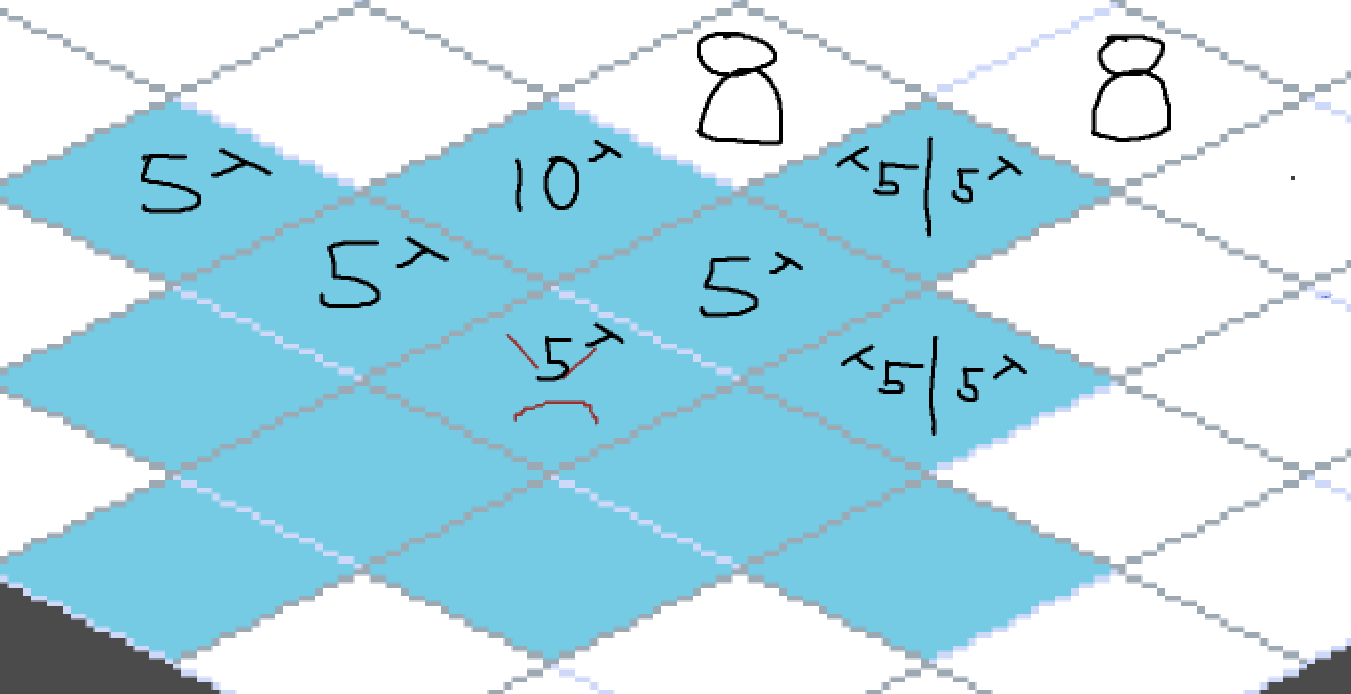
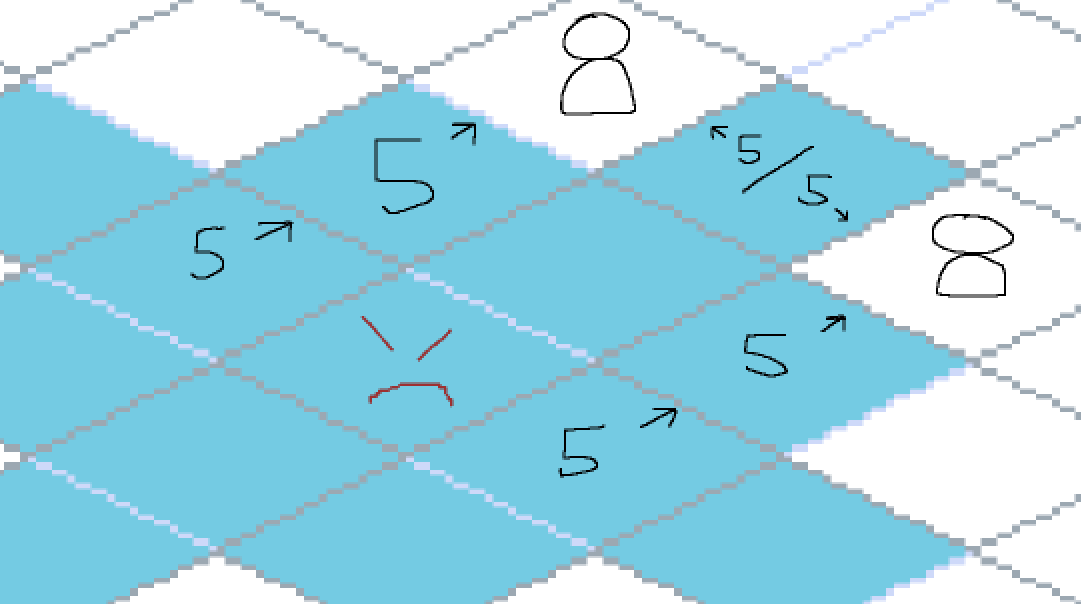
As mentioned in enemy targeting, multiple potential abilities that have the same ability can be added to the same potential cell IF they have different use types (e.g. different directions for the same line-based ability). However, if a potential ability was to be added to a potential cell that already has an existing one with the same ability and use type, the weight value of the incoming potential ability would be added to the existing one’s weight value instead.
| Property Name | Description |
|---|---|
| Potential cell | The potential cell this potential ability is attached to |
| Ability | Describes which ability should be used |
| Use type | Exclusive for line based abilities. Describes the direction in which the ability should be travelling in. Exclusive for pattern based abilities. Describes the pattern used Exclusive for cell targeted abilities. Describes which cells this ability should target. |
| Weight | Describes how likely this cell is to be moved into and the ability that should be used. The weight reflects the “effectiveness” of the potential ability, which is based on the ability’s priority and targeting type. |
Ability Priority
An additional property for abilities unique to enemies. Determines how likely they are to use certain abilities in a variety of situations by modifying the weight of Potential Abilities during Ability Selection.
Ability priority should contain two values. One for targeting the player team and the other for the enemy team.
An ability’s priority property may be changed during combat based on enemy states, but each ability should have a base value that they start a fight with.
Info
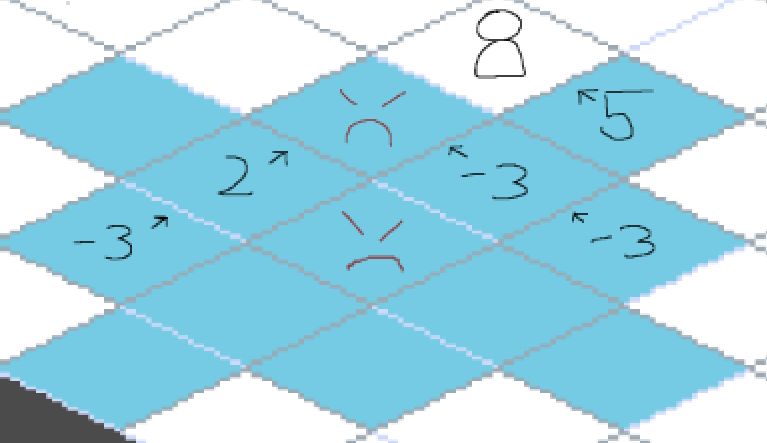
One of the values for ability priority can be set to negative. This is because some abilities can potentially target multiple units in a single action but the enemy would prefer to avoid targting units in a specific team.
For example - an piercing attack could target units from both teams, but setting the ability priority for the enemy team to negative would make the ability avoid targeting enemies, even if it would also hit a player unit.
Factors of board state/Vision
Determines what an enemy can see and calculate with when deciding what to do on their turn. An enemy should have information of the following things about the current board state:
- A list of cells that this unit can move to (these are known as potential cells)
- A list of ally units and their positions.
- A list of all player units and their positions. Does not include player units with the invisible status effect.
- A list of all cells that have modified cell states and their positions.
The board state can manipulate a potential cell’s weight modifier as well as the current state of an enemy.
Cell State Weights
Cells that have a unique cell state directly change a potential cell’s weight modifier.
Since there are only negative cell states, if a potential cell has a unique cell state, that potential cell’s modified weight is decreased by X (i.e. the tile is less likely to be moved on).
Info
For the programming team: please design the architecture so that different cell states modify the weight of a potential cell by different amounts.
Enemy States
Helps determine the playstyle of an enemy. The state of an enemy can add to weight modifier of potential cells to influence the positions that would want to move to. It also can change the ability priority of specific type abilities to incentivise them to use particular abilities. At the start of every turn, the enemy should figure out which state they should be in based on whichever state has the highest final weight. See Calculating State Weight
A state has the following properties.
Rules
Every state that contain contain a set of rules which can influence the likelihood of enemies to go into a specific state. The weight of a rule is calculated by multiplying the success factor and the base weight.
- The success factor returns a value between 0 and 1 that reflects how much of the rule is fulfilled.
- For example - The “high hp on this unit” rule returns a number proportional to this unit’s current hp, with 1 represents 100% hp and 0 represents 0% hp.
- The base weight is a pre-set value that depicts how impactful a particular rule is to a state.
- For example - If a rule has a base weight of 7 and the success factor is equal to 0.5, the weight of the rule is equal to 3.5.
A rule has the following properties.
| Name | Description |
|---|---|
| Description/Name | A description of what the rule does |
| Max Value | The condition to determine the success factor to be 1 |
| Min Value | The condition to determine the success factor to be 0 |
| Base Weight | Depicts how impactful a particular rule is to a state. |
| Weight | The calculated weight of the rule |
Calculating State Weight
A state’s final weight is equal to the weighted average of all rules. The weighed average is calculated by:
- Get the sum of all the rule weights, then
- Divide that value by the sum of all base weights from each rule.
The state’s final weight can also be manipulated by an enemy’s preferred state, the team state and the state’s Requirements.
Preferred State
Each enemy should have a preferred state that they want to be in. This will increase the chances to go into a particular state by adding a flat amount to the final weight of that state.
Team State
Determines the overall team state enemy should be in. Just like an individual enemy unit’s state, there are 4 main team states the enemy can be in in.
- Aggressive
- Defensive
- Supportive
- Keep Away Determining which team state the enemy should be is similar to figuring out which individual state the enemy should be in. That is, each team state has their own rules that influence the likelihood of the enemy team entering that state. The rules for each of the states can be seen in the table below.
| Team State | Rules |
|---|---|
| Aggressive | - Enemy units are mainly “Offensive” units - Low player team HP - Lower number of player units than enemy units |
| Defensive | - Enemy units are mainly “Tank” units - High enemy team HP - At least 1 “Support” unit |
| Supportive | - Enemy units are mainly “Support” units - Low enemy team HP - At least 1 “Tank” unit |
| Keep Away | - Low enemy team HP - At least 1 allied “Support” unit. - Lower number of enemy units than player units |
| When a team state has been determined, it helps influence the individual enemy unit’s state to favor the team state. Like the unit’s preffered state, this is done by adding a flat amount to the final weight of that state. |
Requirements
Each enemy state should also have their own requirements that need to be fulfilled. Requirements are similar to rules, but if an enemy cannot follow a state’s requirement then they cannot go into that state and the state’s final weight is set to 0 regardless if it’s preferred or not.
List of States
Aggressive
Description:
- Prioritise grid positions that are X cells from any player unit.
- Attacking/Damaging abilities have increased ability priority. Rules:
- Low player team hp.
- Low amount of player units
- High hp on this unit.
- This enemy has at least 1 damaging ability available. Requirements:
- This enemy has at least 1 damaging ability.
- There must be at least 1 visible player unit this enemy can reach.
Supportive
Description:
- Prioritise grid positions closest to any ally unit.
- Abilities that target allies have increased ability priority. Rules:
- Low enemy team hp.
- High number of enemy units.
- This enemy has at least 1 ability available that targets allies. Requirements:
- This enemy has at least 1 ability that targets allies.
- There must be at least 1 ally unit this enemy can reach.
Defensive
Description:
- Prioritises grid positions that are X cells from ally units.
- Further prioritises cells near ally with the lowest current hp%.
- Defensive and Shielding abilities have increased ability priority. Rules:
- Low hp allies.
- High hp on this unit.
- This enemy has at least 1 defensive/shielding ability available. Requirements:
- This enemy has at least 1 defensive/shielding ability.
- There must be at least 1 ally unit this enemy can reach.
Keep Away
Description:
- Avoids cells that are X cells away from player units. Rules:
- Low hp on this unit.
- Low amount of available abilities.
- No other allies in the keep away state.
- High number of enemy units. Requirements:
- This enemy has at least 1 player unit they can reach.
Idle
Description:
- All abilities have 0 priority. Rules:
- None Requirements:
- All other states have a weight of 0.
List of Rules
| Rule Description | Max Value | Min Value | Base Weight |
|---|---|---|---|
| High hp on this unit | This unit has 100% hp | This unit has 5% hp | |
| Low hp on this unit | This unit has 5% hp | This unit has 100% hp | |
| High Y* team hp | Total combined hp of all units on Y* team is 100% | Total combined hp of all units on Y* team is 5% | |
| Low Y* team hp | Total combined hp of all units on Y* team is 5% | Total combined hp of all units on Y* team is 100% | |
| Low hp allies | Total combined hp of all ally units on enemy team is 5% | Total combined hp of all ally units on enemy team is 100% | |
| Low number of Y* units | 1 Y* team unit alive | No Y* team units dead | |
| High number of Y* units | No Y* team units dead | 1 Y* team unit alive | |
| This unit has at least 1 X* ability available | This unit has 1 or more available X* abilities | This unit has no available X* abilities | |
| Low amount of available abilities. | 0 available abilities | 3 available abilities | |
| Low amount of allies in “keep away” state. | No other ally is in “keep away” state | All other allies are in “keep away” state | |
| Notes: |
- X* is the type of ability (healing, damaging, shielding etc.)
- Y is the particular team (either player or enemy team)
- Team hp is calculated using a unit’s percent current health not individual health value. Dead teammates are not taken into account.
- Rules that specify enemy/ally team include this unit. Rules that specify “allies do NOT include this unit.
Ability Selection
The bulk of the enemy behaviour logic. Determines which ability should be used and where an enemy should move to use the ability effectively.
Phase 1
Get a list of all available abilities and Potential Cells. Available abilities are abilities that an enemy can use during their turn.
Unavailable
Abilities that are on cooldown or have a priority of 0 are NOT available abilities and therefore won’t be considered during the ability selection process
Phase 2
Each available ability is calculated one at a time during this phase. All potential cells where using the current ability from the cell’s grid position is “effective” has a potential ability added to it. The added potential ability should contain the current available ability, the way to use the ability and how effective the ability is when used.
The effectiveness of a potential ability is calculated based on the targeting type of the ability as well as the ability’s priority. In most cases, the effectiveness/weight of a potential ability is equal to the ability’s priority. However, if the ability can hit multiple targets depending on positioning, the effectiveness/weight of the potential ability is determined by the ability’s priority, how many targets are hit as well as the type of targets hit. Since every targeting type has it’s own logic for determining where potential abilities can be used, it has been moved to its own section called Enemy Targeting.
Phase 3
After all calculations, set each potential cell’s final weight equal to the weight of their highest weighted potential ability added to the cell’s weight modifier.
Enemy Targeting
Describes how every single ability can be used to target anything. This sections figures out which potential cells an enemy must stand on to be able to use an ability effectively. It also calculates which potential cells receive potential abilities.
The general logic for calculating which potential cells receive potential abilities is as follows: For every unit on the board, get a list of every cell that this enemy would need to stand on to target the unit. If any of those cell’s grid positions have the same grid position as a potential cell, add a potential ability to that potential cell.
The specifics for which cell an enemy needs to stand to to use an ability depends on the use type of the ability.
Keep in mind some abilities can hit multiple targets in a single use. In this case, multiple potential abilities with the same ability can be added to the same potential cell IF they have different use types (e.g. different directions for the same line-based ability). If a potential ability was to be added to a potential cell that already contains an existing potential ability with the same ability and use type, the weight values of both potential abilities would instead be added together.
Note
A general tip for figuring out which cells need to be stood on to hit an particular unit. Pretend that the targeted unit is using the ability. Whichever empty cells can be hit by the ability are the cells that this enemy needs to stand on to hit the targeted unit.
Info
The diagrams below give examples positions and weight values for abilities of that type. Here is a legend:
- Potential Cells
- Enemy units (“This enemy/unit” is the enemy in the middle of all potential cells)
- Player units
- Potential abilities (Has a number for its weight and unique use type)

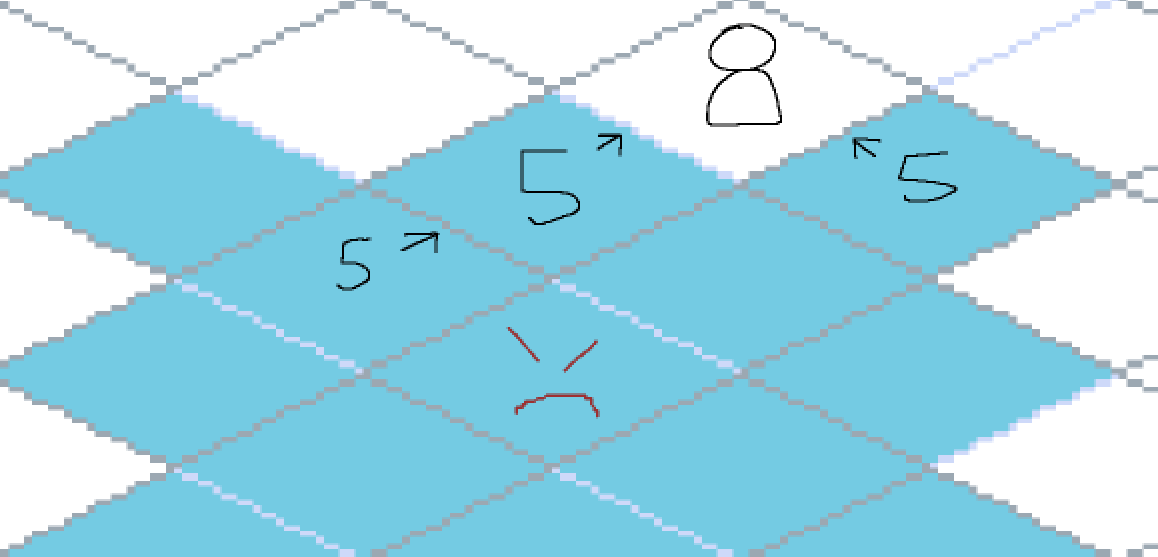
Projectile - Line Targeting
When calculating which cells a line-based ability can be used to target a unit, take into account the range of the ability, possible directions the ability can be used in and line of sight.
The potential ability added should contain the ability, the direction needed to in and the weight of the ability.
Example of a projectile attack
Example of a projectile attack that can target multiple different enemies on the same cell
Piercing - Line Targeting
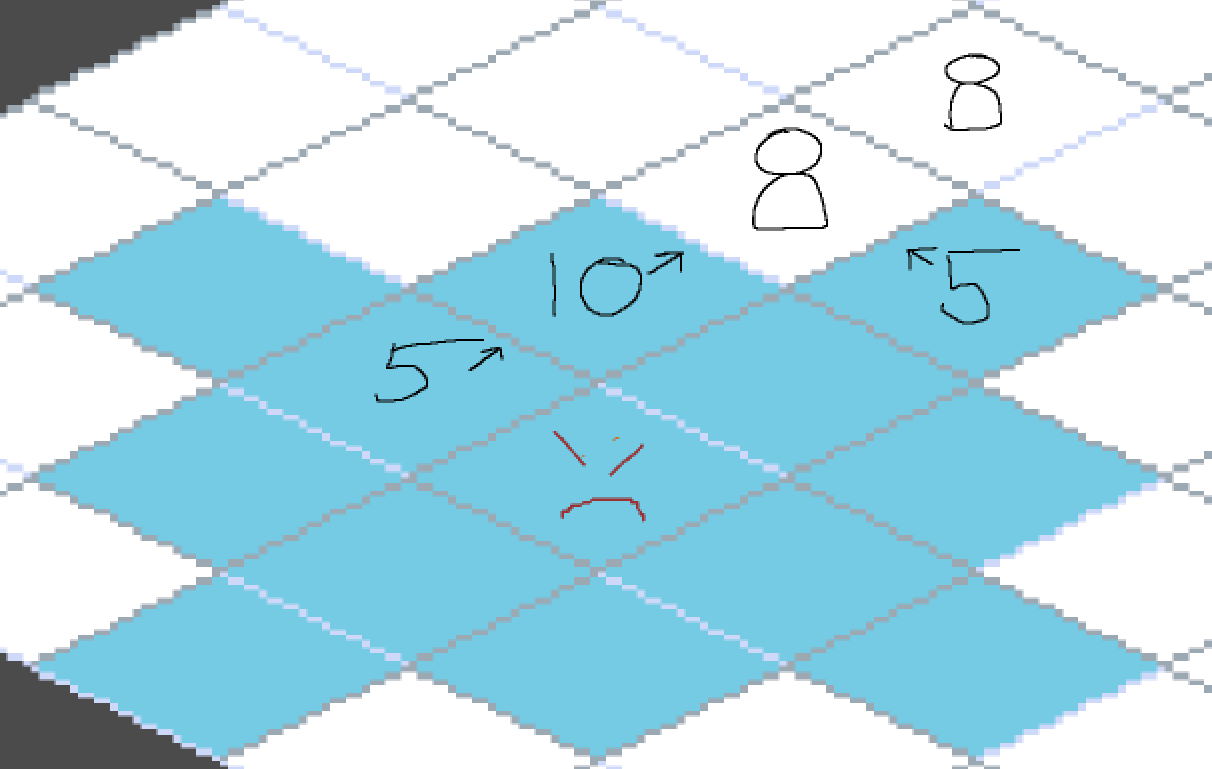
Basically the same logic as the line projectile targeting type since they are both line-based abilities. However, piercing abilities ignore unit collisions when calculating line of sight and only stop at non-unit entities. This means that by default, piercing abilities can target multiple units in a single cast and need to add their weights together for each unit it passes through.
The potential ability added should contain the ability, the direction needed to in and the weight of the ability.
Example of an piercing attack.
Example of a piercing attack with allies being considered.
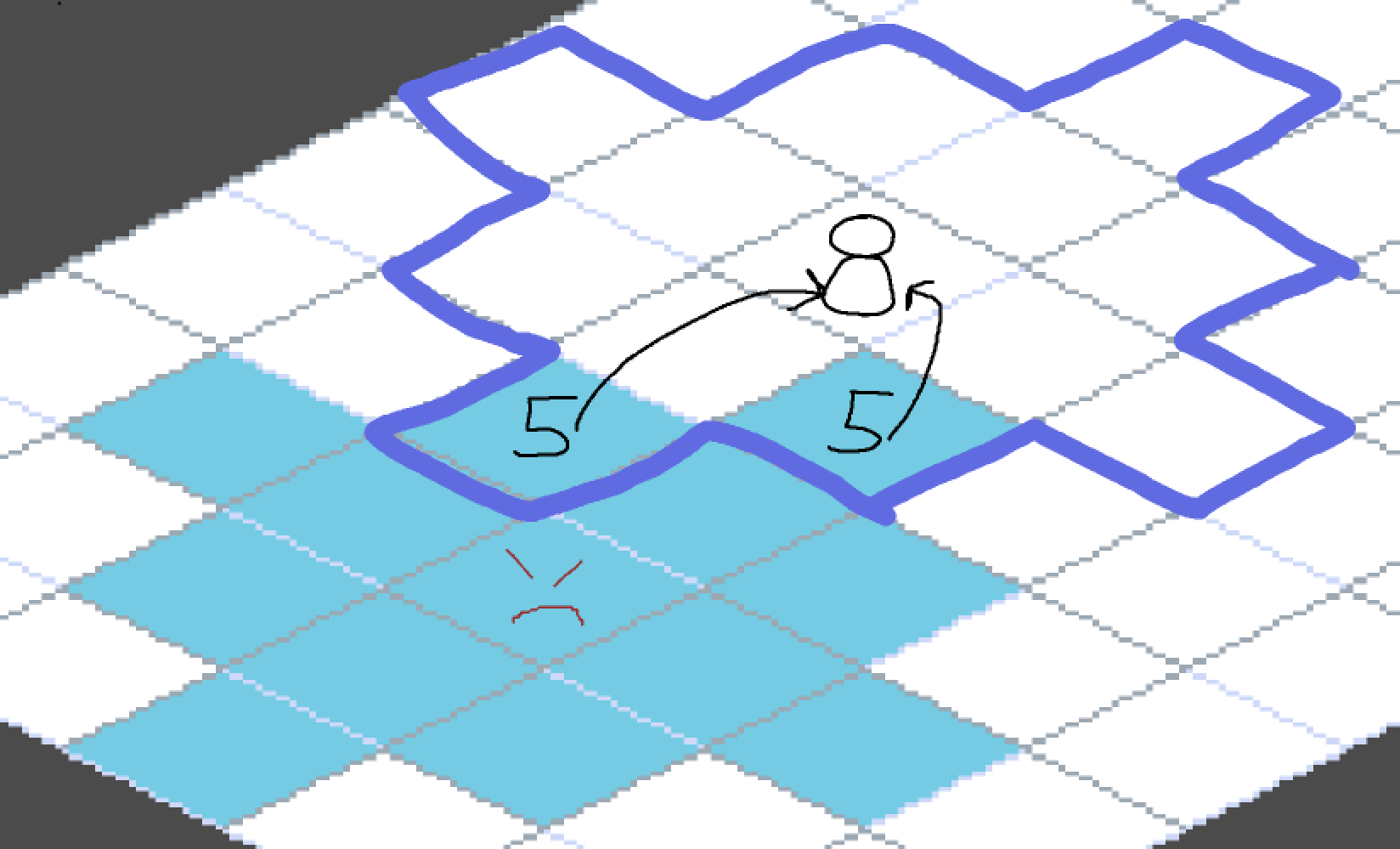
Radius Targeting
When calculating which cells a radius-targeted ability can be used from to target a unit, take into account the radius of the ability.
The potential ability added should contain the ability, the cell it intends to target and the weight of the ability.
Example of a radius targeting ability. Dark blue highlights where an enemy would have to stand to target the unit. Since there are only 2 potential tiles it overlaps with, only those 2 potential tiles get potential abilities added to them.
Pattern Targeting
Most patterns would be able to hit multiple units and thus will need to take into account the additive weights.
The potential ability added should contain the ability, the pattern used and the weight of the ability.
Pattern-styled ability used in following example
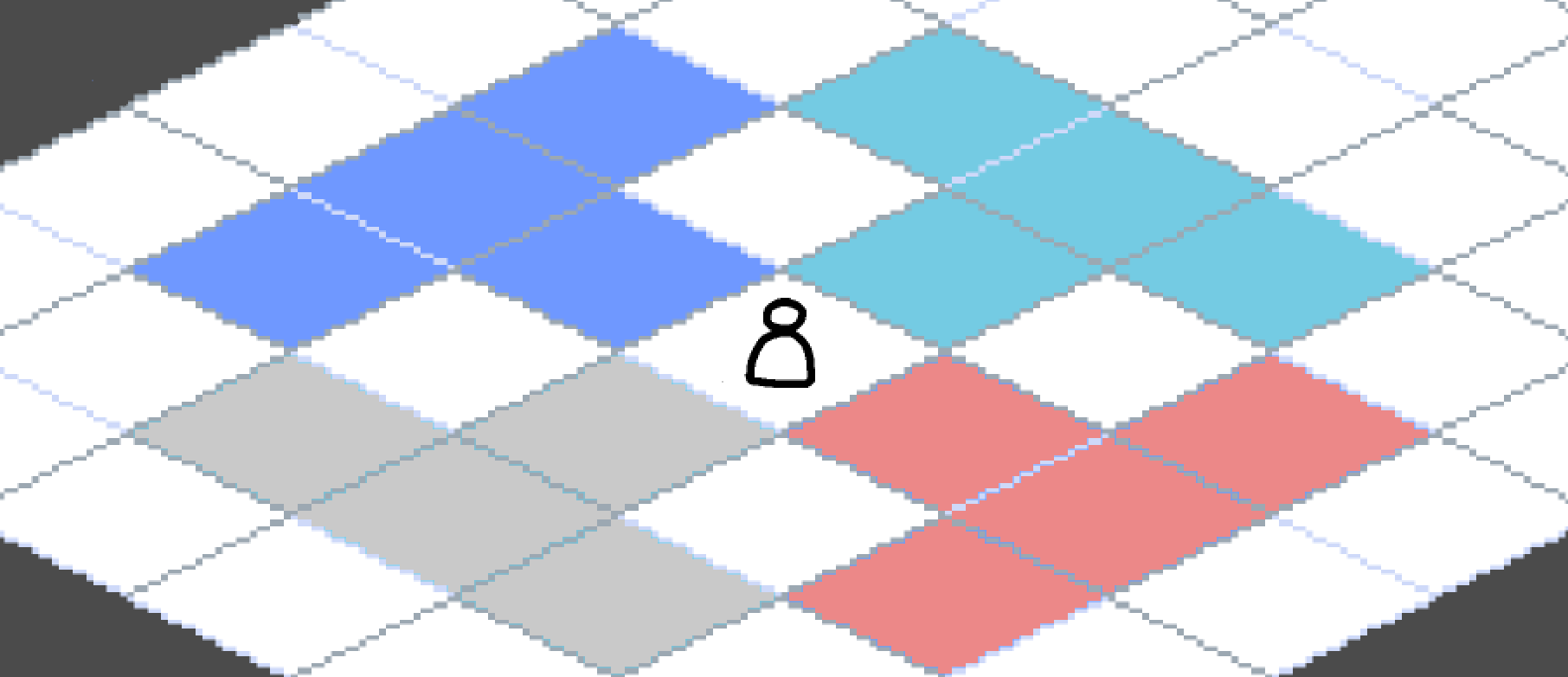
Example of a pattern ability hitting 1 unit.
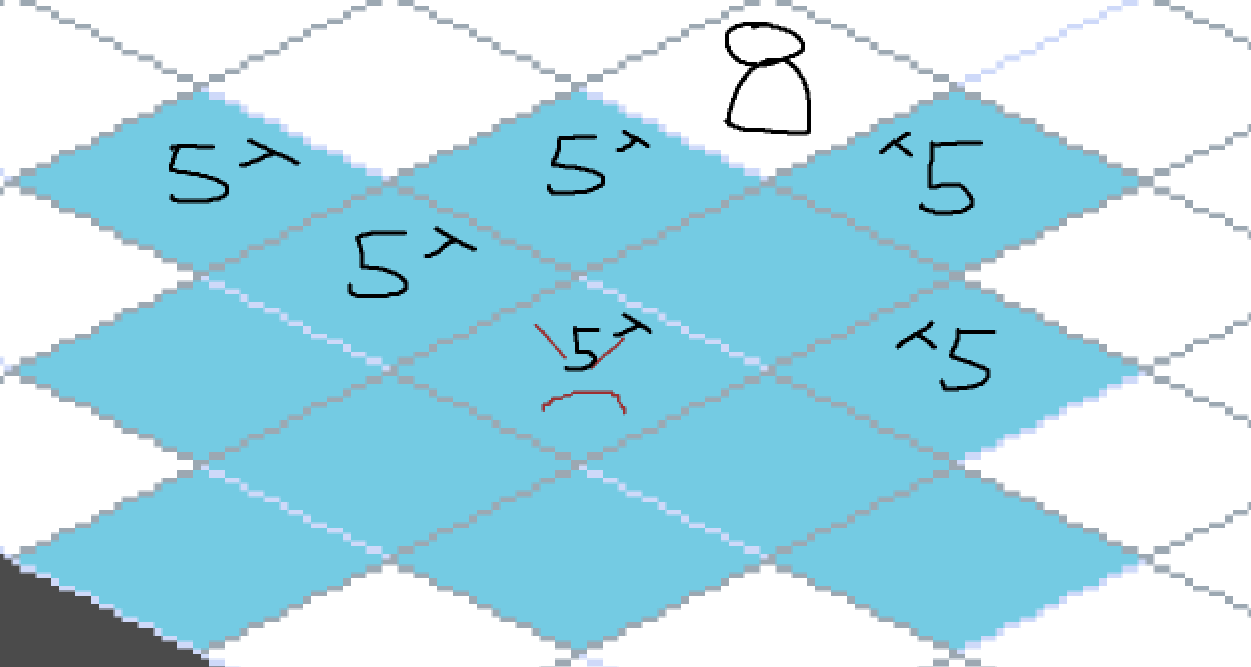
Example of the pattern ability hitting 2 units