Change Log
- References to a “run” have been replaced with the term “run”.
- Removed empty rows from animation table.
The core participating entities in the Battle System.
Teams
Battles have two teams: one for the player (Characters), and one for the computer (Enemies). A unit may only belong to one. This mostly just affects the player’s win condition, but some abilities or items may apply an effect to “all allies”, “all enemies”, or “all units”.
Stats
Every unit has the following stats. These are determined by the unit’s base values for each (set by the designers), and whatever modifications are made by items or status effects.
All of these stats are numbers, which must be clamped to the ranges provided.
| Stat | Abbr. | Range | Effect |
|---|---|---|---|
| Damage | DMG | 0-INF | The percentage increase of damage this unit deals. 1 point = +1% damage. |
| Health | HP | 1-INF | The maximum HP (health points) the unit can have. (Inherited from Entities) |
| Speed | SPD | 1-INF | The number of tiles this unit can travel in one movement. 1 point = 1 cell. |
| Luck | LCK | 1-100 | The chance for a unit’s attacks to crit. 1 point = 1%. Caps at 100%. |
| Evasion | EVD | 0-INF | The chance for an attack to have no effect. 1 point = 1%. |
Favour increased health pools over high defense stats.
Attack damage shall mainly be determined by abilities, items, and other effects that deal damage; however, we’re letting players increase their damage stat by a small amount to keep up with enemies (though it will be expensive).
This will result in super big numbers in the mid-late game, as attack power and health pools grow at a relatively similar rate.
Classifications
Units should have a field that stores which of the following classifications it has. This value is never exposed to the player, but it is should be used by the enemy AI to figure out how it should act (and how its allies/opponents are expected to act)
- Offensive
- Tank
- Support
A unit’s turn
On a unit’s team’s turn, it may:
- Take one movement action
- Use one ability.
Info
For the programming team: please design your architecture for these actions to support multiple movement actions or multiple uses of abilities in one turn. Basically a “movement point” and “ability point” system, where (for now) units get one of each per turn, and taking the action consumes the point.
This gives us the freedom to change the design surrounding these actions in the future if necessary.
Movement Action
On a unit’s movement action, they may move up to a certain number of cells on the grid (determined by their speed stat, and modified by whatever items/status they might have). They may only move in cardinal directions. (See Diagrams).
Movement sequence overview
- The movement action is initiated. (For the player, this means switching the UI to the Player Movement UI.)
- The unit selects a path to follow, provided they have enough movement to do so.
- The movement action ends when the path is followed to completion, or the unit’s movement is interrupted. If they cancel their movement without actually starting to move, the movement action is not consumed.)
Specifics
- While following the path, the unit procs the on cell enter effect for every cell they enter, and the on cell exit effect for every cell they exit.
- The unit does not have to use all of their allowed movement.
- “The shortest path from one cell to the next in the sequence” is used to create the movement path.
- If the unit simply wants to take the shortest path to a particular cell, they can select just that cell.
- If they want to take a path that is different from the shortest one calculated by the game (to avoid a hazard, for example), they can choose it themselves by selecting certain cells to move to in sequence.
- If some effect disrupts the unit’s movement, such that it can no longer follow its desired path all the way, the movement action is ended and consumed in place.
- When determining the shortest path to a cell, if there are multiple paths of the same distance, the game should try to pick the safest one. If both paths are equally safe/dangerous, it should just pick one at random.
For programmers
That last point is the one that might be the most anal to program. There’s a lot to consider when deciding if a path is “safe” or not. You could probably reuse whatever logic you use in the enemy AI.
If it’s too complex and your efforts are better spent elsewhere in the project, we could get away with just picking one path at random, considering the player/enemy can make multiple movements to override the automatic pathfinding.
Diagrams
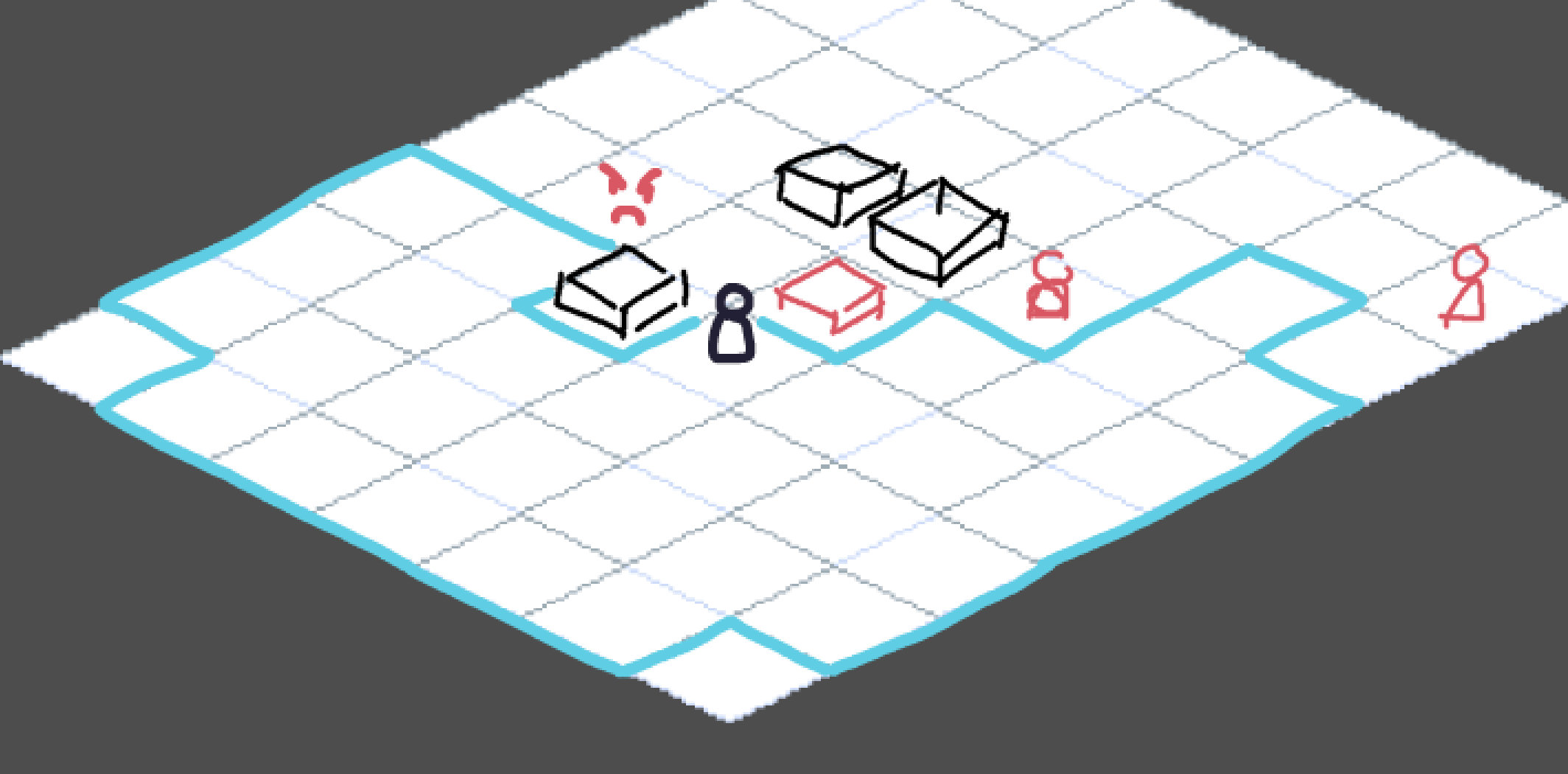
This diagram shows the cells a unit could move to if it had a speed of 5. Every cell that can be reached by moving one cardinal direction at a time is in range. Note how obstructions (such as crates or other units) influence the pathfinding.
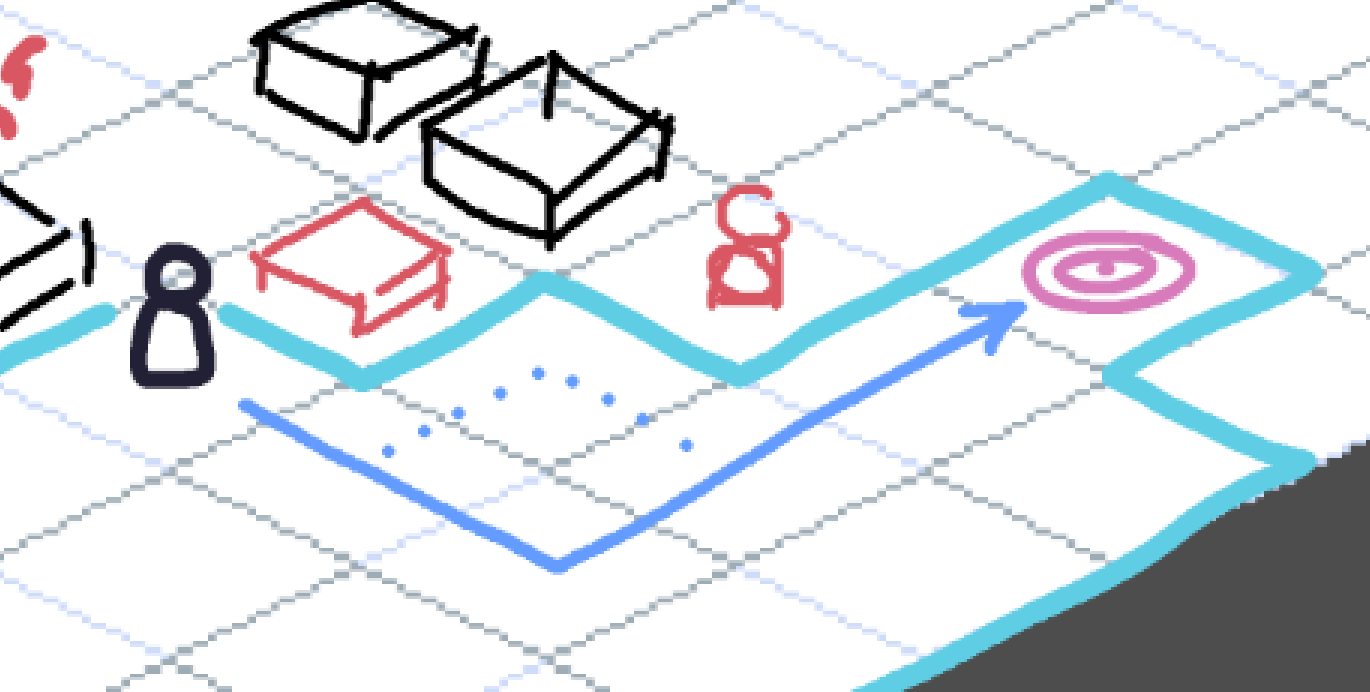
In this diagram, the unit (with a speed of 5) wants to move to the pink target. It will simply select the target cell and follow the shortest path there.
There are actually multiple paths the unit could take to get there, but it doesn’t matter which one they take in this specific case.
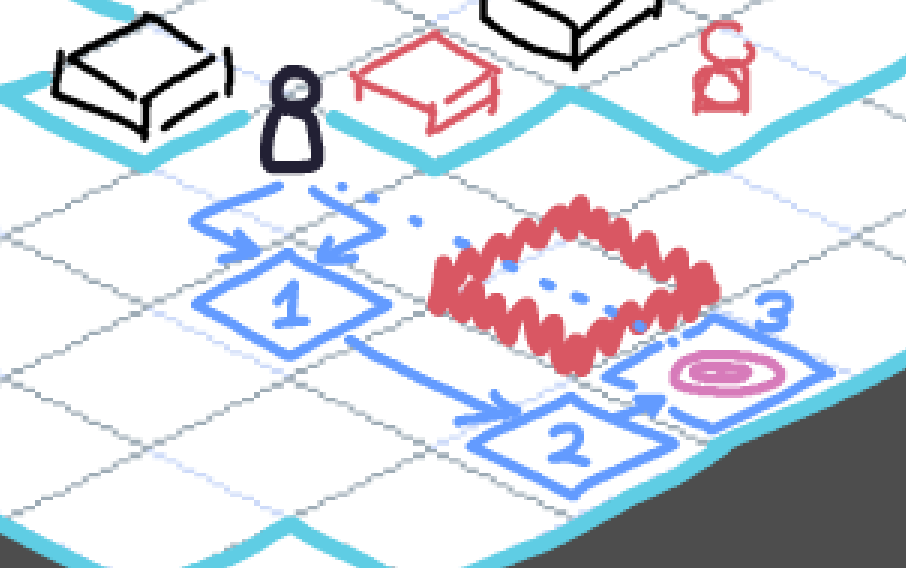
In this diagram, the unit (with a speed of 5) wants to move to the pink target. The shortest path goes through a cell that is on fire, so if it were to select the target location directly, it would move right into the fire (bad).
Instead, it will select several cells to reach the same destination along a different path, circumventing the automatic pathfinding. It will click on (1), then (2), and then finally the target space (3).
This still counts as one path, and one movement action.
Player-specific details
- The Battle UI and Controls page details what the player should see and how the controls should work during their units’ movement action.
- The player can only Undo an entire movement action (not each individual movement within an action).
Passives
Passives are unique traits that affect units in battle. They apply automatically and do not require any manual input from the player or computer controlling the unit.
Equipping Passives
For programmers:
Units of any type should be able to have any number of passives equipped. The below restrictions for enemies/players shouldn’t be built into their architecture; it’s more of a design and player-input restriction.
- Enemies: Enemies may or may not have passive abilities, depending on the type of enemy. It does not change between instances of the same enemy.
- Players: All player units (characters) have at least 2 potential passives to choose from at the start of the run. 1 is unlocked by default, and the rest are alternate passives that can be unlocked for future runs (see Progression System). Players must choose 1 passive from all the unlocked passives for that character. Players can only have 1 equipped.
Abilities
Abilities are actions that a unit can take during their turn using the ability action. Each unit has 3 unique abilities equipped. Each ability has a target type, a unique set of effects, and some other parameters.
Ability action sequence overview
- The unit selects an ability to use. (For the player, this will result in switching to the Ability UI)
- The unit specifies which cell(s) they intend to target, then uses the ability on the targeted cells(s), executing all of the ability’s effects.
- The ability action ends once the selected ability and (if possible) all item effects on the map have finished.
Equipping Abilities
For programmers:
Units of any type should be able to have any number of abilities equipped. The below restrictions for enemies/players shouldn’t be built into their architecture; it’s more of a design and player-input restriction.
- Enemies: All enemies are equipped with 1-3 abilities unique to them. These abilities do not change between instances of the same enemy.
- Players: All player units (characters) have at least 4 potential abilities to choose from at the start of a run. 3 of these abilities are unlocked and equipped by default; the rest are alternate abilities which can be unlocked for future runs (see Progression System). Players must choose any 3 abilities from all the unlocked abilities for that character.
Ability Properties
For programming: Friendly Fire
Some abilities may affect units differently depending on the team they’re on. A unit could be an ally or an opponent.
This does not need to be its own parameter, as the Valid Targets field can force targeted cells to be occupied by units of a certain alignment (and you can also just program the ability to affect units of different alignments differently).
Target Type
The target type of an ability determines how the unit selects which cells the ability is use on. It influences how the unit needs to position itself to use the ability effectively.
Line Targeting
The unit selects a direction (stemming from their current position), and the ability affects cells in that direction. By default, the ability will affect only the closest obstruction in that direction (emulating the concept of line of sight). The properties below modify this behaviour.
| Properties | Description |
|---|---|
| Cardinal | Specifies if the ability can target cardinal directions. |
| Diagonal | Specifies if the ability can target diagonal directions. |
| Piercing | Instead of the default behavior, the ability will affect all in-range units in a particular direction, up until the first non-unit obstruction. This emulates the behavior of a piercing attack that hits multiple enemies but gets stopped by a wall. |
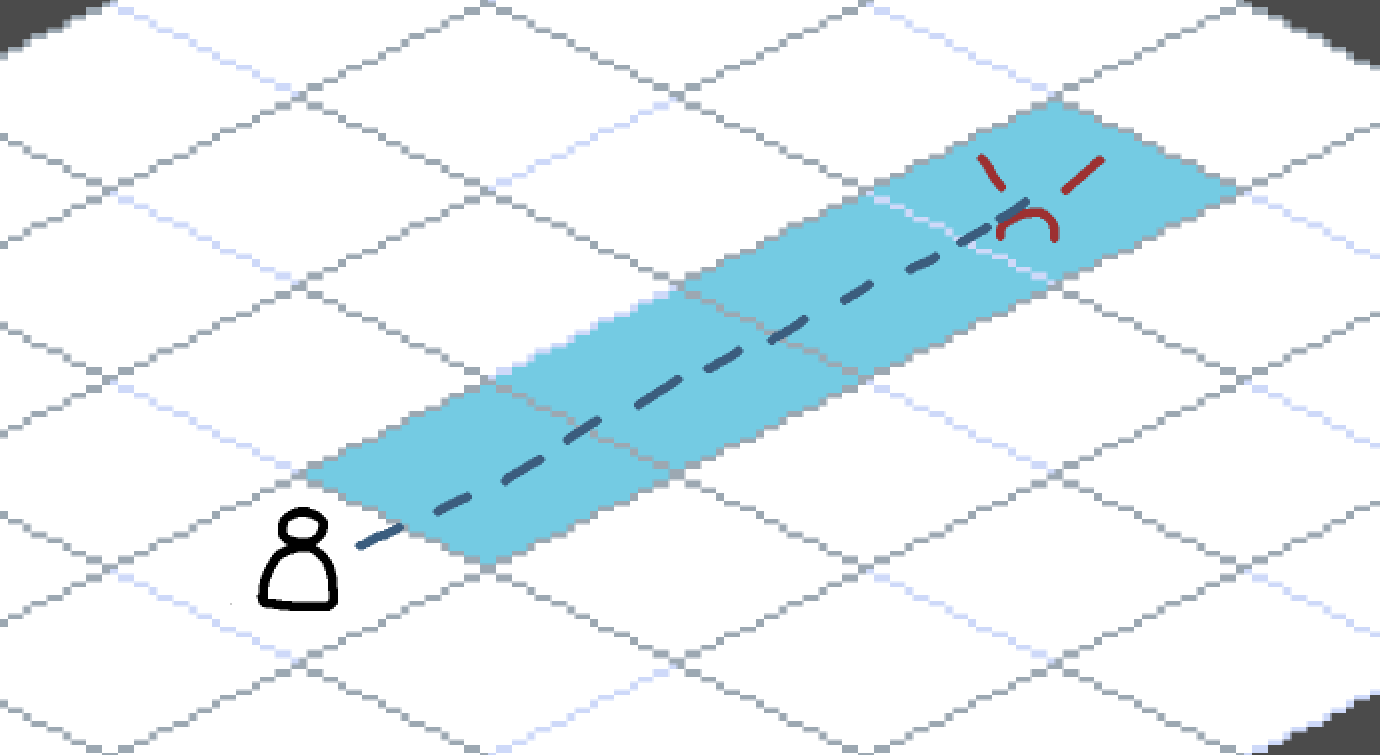
| Trail | In addition to the default behavior, line-targeted abilities may apply an affect to every single cell in that direction |
Figure 1
Example of a line targeting ability. Showcases all cells that can be targeted in cardinal directions.
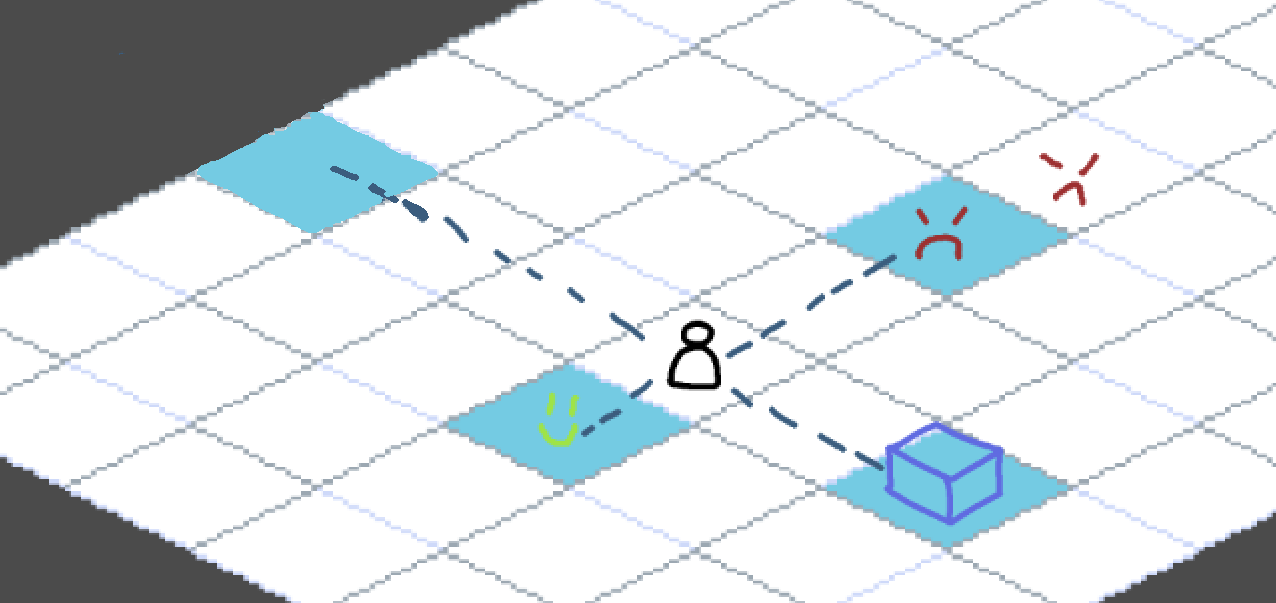
Figure 2
Example of a line targeting ability with the piercing property.
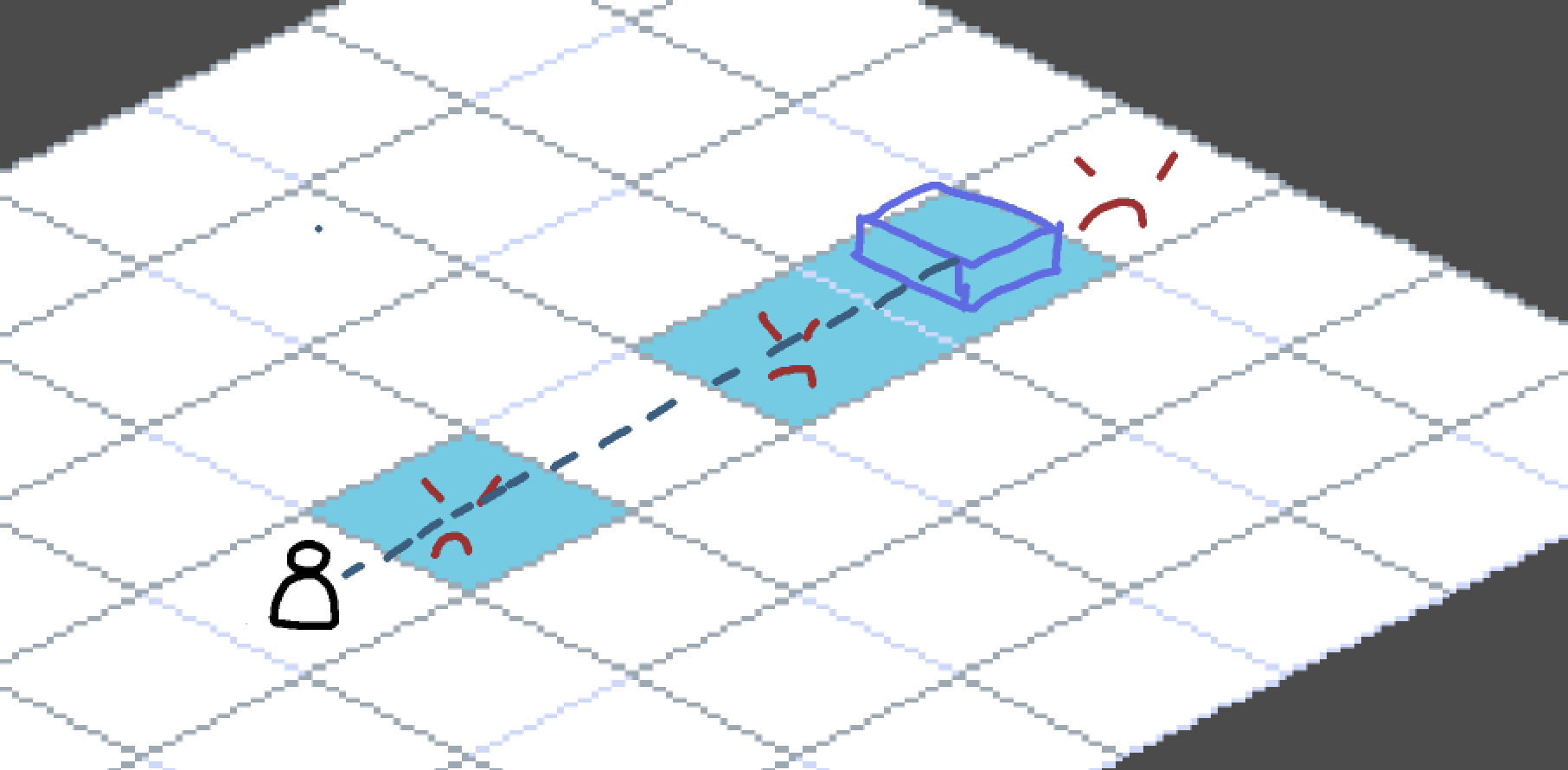
Figure 3
Example of a line targeting ability with the trail property.
Radius Targeting
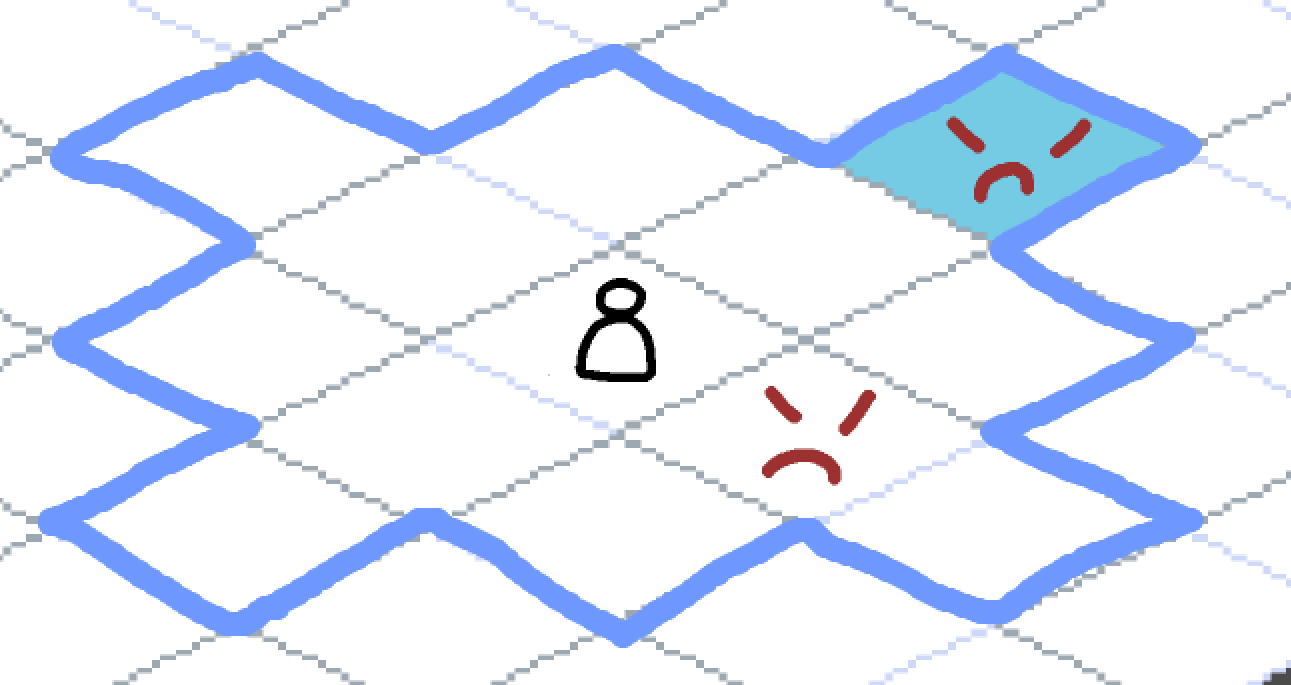
The unit selects any cell within a specified radius. These abilities ignore line of sight.
Figure 4
Example of radius targeting. The blue border represents the radius range and the cyan tile represents the selected cell.
Pattern Targeting
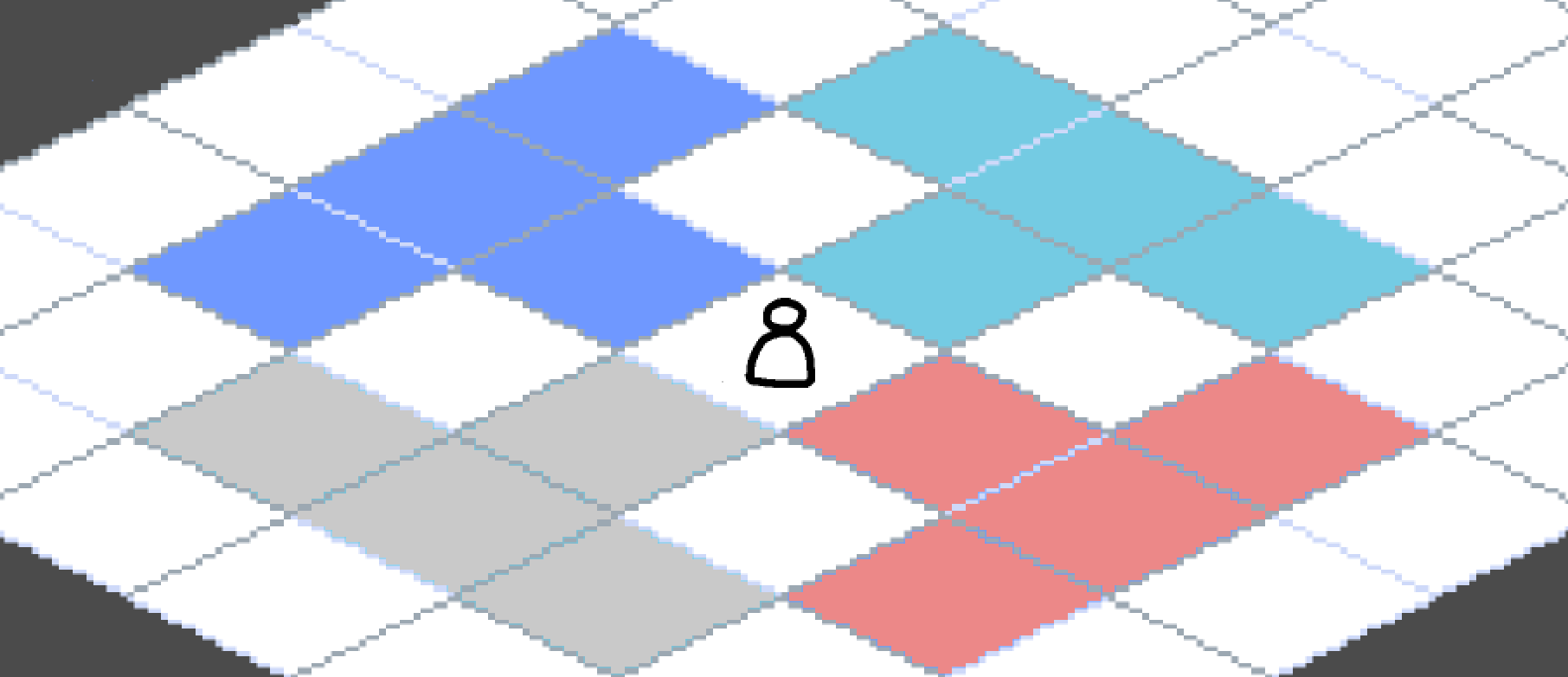
The ability specifies at least one set of cell patterns which can be selected. Cell patterns specify at least one cell (in relation to the unit’s current position) which would be affected by the ability.
The unit selects one pattern to target, and the ability affects every cell in that pattern. (See Figure 5 and Figure 6 below). These abilities ignore Line of Sight.
Figure 5
Example of a pattern
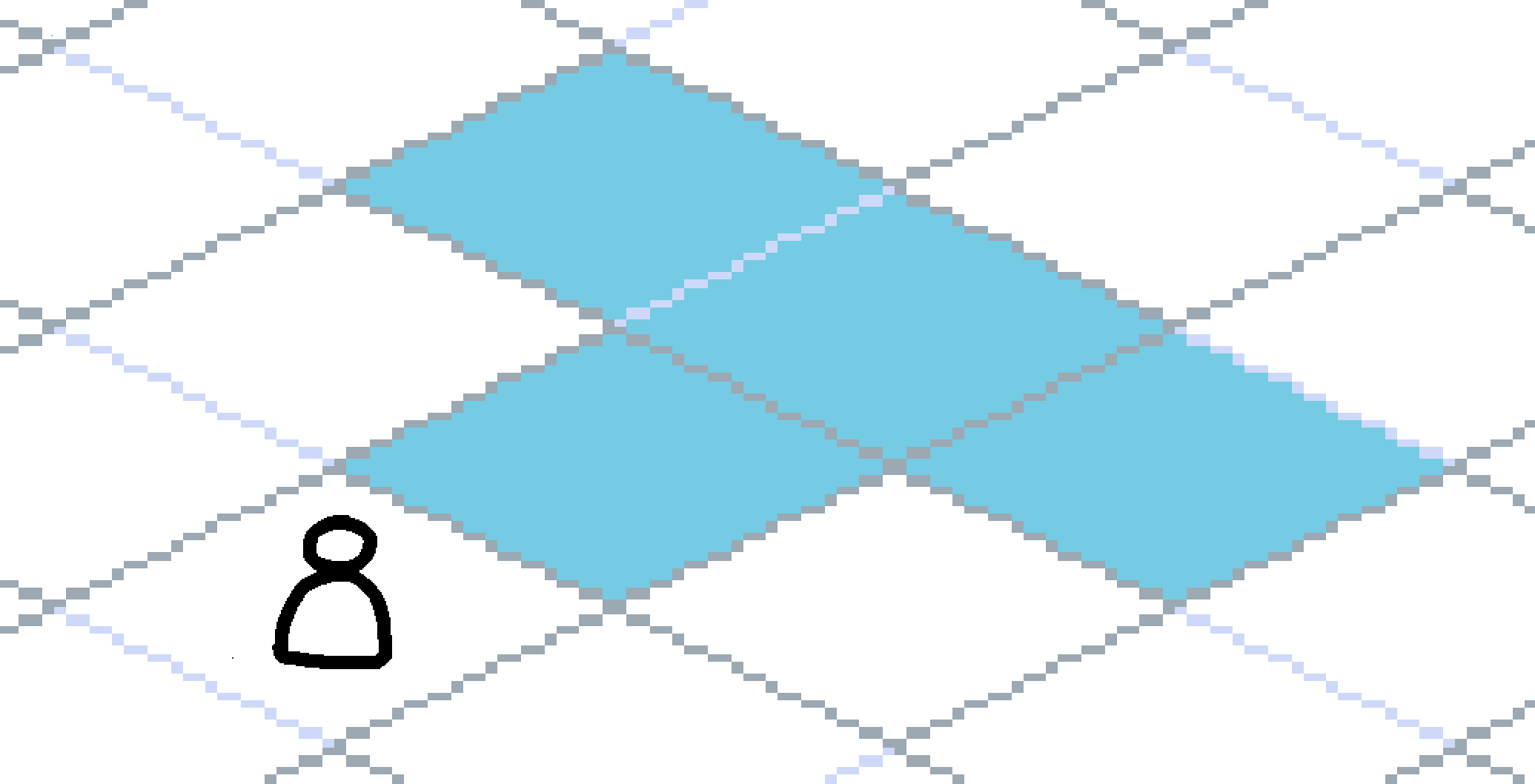
Figure 6
Example of the four available patterns for this ability
Effects
Any ability can possess one or more of the following effects for units and/or cell states on selected tiles (combinations may vary)
-
Combat oriented effects
-
Utility/non-combat oriented effects
- Dashing and Teleporting to manoeuver around the map.
- Healing and shielding to prevent health loss for units.
- Manipulating cell states to control areas of the map.
Critical Hits
Any hit (an instance of damage) has a chance to be a critical hit, based on their luck stat and any item or ability effects. Critical hits deal 2x damage by default (items or abilities may change this damage modifier).
Player-specific details
- The Player Ability UI page details what the player should see and how the controls should work during their units’ ability action.
Animation
Units should support the following animations.
| Animation | Description |
|---|---|
| Idle | Looping animation played while standing still. |
| Ability 1-12 | One-shot animations played when an ability is used. All units must have at least one, but can implement up to 12. (I don’t think any single unit will need more than 12…) Transitions back into idle. Each of the unit’s abilities will specify which of the animations to play when it’s used. |
| Move | No dedicated animation. As the unit enters a new tile, their sprite instantly squashes vertically, and then gradually returns to its normal height. |
| Hurt | No dedicated animation. The unit flashes white and rapidly shakes horizontally for a short time. |
| Death | No dedicated animation. Same as hurt, but lasting much longer. |
Sprite Flipping
- Sprite flipping is purely visual. It doesn’t affect the game state at all.
- Sprite flipping is purely horizontal.
- A unit’s sprite should flip if the target direction of their movement or action is the opposite direction to which they’re currently facing.
- For movement, the flip will occur the moment the unit leaves each cell.
- For ability targeting, the flip will occur as soon as the ability is selected.
- If the target direction is directly up, directly down, or nothing (i.e. target the unit’s own cell), their direction will not change.
- Patterns in “pattern targeted” abilities should be able to specify a particular direction that they represent for this purpose: left, right, or none. (“None” will be used for patterns that are directly up or down, or that target all adjacent cells, or just the cell you’re on, etc.)
- Ability scripts and animation timelines should be able to trigger a flip, in case it’s required for animation purposes.
Cancelled Animations
These were animations we originally specced for, but have removed to save on scope.
| Animation | Description |
|---|---|
| Move | Looping animation played while moving during the movement action. One “footstep” should line up with one cell movement. |
| Hurt | One-shot animation played upon taking damage. Transitions back into idle. |
| Death | One-shot animation played when the unit dies. At the end of the animation, the unit disappears (some VFX should play to cover this up). |
Starting Health Values
The following are the base health values for different unit types (These will likely be updated during balancing).
| Unit | Health Value |
|---|---|
| Tanky | 125 HP |
| Standard | 100 HP |
| Squishy | 75 HP |